


Download Video Edit Pro – Professional Video Editing Software for Windows, Mac, Android & iOS
Overview
Video Edit Pro is a robust video editing bundle designed for personal users who need a reliable, fast, and feature‑rich tool to trim, splice, and re‑encode their media files. Built around a lightweight core of just 10.8 MB, the suite supports a wide range of codecs—including H.264, HEVC, MPEG‑4, and AVI—so you can work with virtually any video source without the need for additional plug‑ins. Whether you’re a budding YouTuber, a home‑movie enthusiast, or simply someone who wants to clean up recorded footage, Video Edit Pro delivers a secure, free‑to‑try experience that scales smoothly from casual trims to more sophisticated timeline edits. The interface balances professional terminology with an intuitive layout, making it easy for beginners to locate tools while still offering depth for power users. Regular automatic updates ensure that the software stays compatible with the latest operating system releases and codec standards, keeping your workflow both current and secure.
What sets Video Edit Pro apart is its emphasis on speed without sacrificing quality. The proprietary trimming engine processes high‑definition clips in real time, meaning you can preview changes instantly and export final videos with minimal render time. The bundle also includes a set of built‑in presets for popular platforms such as YouTube, Instagram, and TikTok, allowing you to output the correct resolution, bitrate, and aspect ratio with a single click. In addition, the software respects user privacy: all processing occurs locally on your device, and no video data is uploaded to the cloud unless you explicitly choose to share it.
Key Features & Benefits
- Multi‑codec support: H.264, HEVC, MPEG‑2, AVI, MOV, WMV, and more.
- Real‑time trimming and cutting with frame‑accurate precision.
- Built‑in video effects: transitions, filters, text overlays, and color correction.
- Export presets for YouTube, Instagram, TikTok, Facebook, and Vimeo.
- Lightweight installation – only 10.8 MB of disk space required.
- Batch processing for applying the same edit to multiple files.
- Audio ducking and background music integration.
- Secure, offline processing – no cloud upload required.
- Automatic updates to keep codecs and UI current.
- Cross‑platform availability: Windows, macOS, Android, and iOS.
Beyond the listed capabilities, Video Edit Pro offers a suite of hidden advantages that improve everyday editing tasks. The timeline view is customizable, allowing you to expand or collapse tracks based on the complexity of your project. Keyboard shortcuts are fully configurable, giving power users the ability to speed up repetitive actions such as cutting, copying, and pasting clips. The software also includes a built‑in media library that indexes all video files on your computer, enabling quick drag‑and‑drop access without leaving the editor.
From a performance standpoint, the application leverages hardware acceleration on supported GPUs, which translates to smoother playback and faster render times on modern machines. For users on older hardware, the program intelligently falls back to CPU rendering while still maintaining a responsive UI. The free trial version provides unrestricted access to all features for 30 days, after which you can purchase a one‑time license that removes the “Trial” watermark and unlocks premium export options.
Installation, Usage & Compatibility
Step‑by‑Step Installation
Downloading and installing Video Edit Pro is straightforward:
- Visit the official website and click the Download button for your operating system (Windows, macOS, Android, or iOS).
- The installer file (
.exe,.dmg,.apk, or App Store link) will start downloading automatically. - Run the installer and follow the on‑screen prompts – the process typically takes under two minutes due to the small file size.
- After installation, launch the app and accept the end‑user license agreement.
- If you are on Windows or macOS, you may be asked to grant permission for video and microphone access; this is required for full editing capabilities.
Getting Started with Your First Project
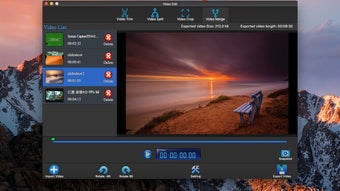
Once the program opens, you’ll see a clean welcome screen with options to Create New Project or Open Existing Project. Choose “Create New Project,” then drag your source video files into the media bin. From there, you can drop clips onto the timeline, use the trim handles to cut unwanted sections, and apply effects via the right‑hand panel. The preview window updates in real time, so you can see exactly how each edit will look before exporting.
Exporting is equally simple: click the Export button, select a preset (e.g., “YouTube 1080p”), adjust any custom settings such as bitrate or frame rate, and hit “Start.” The software will render the final file to your chosen destination folder, typically within seconds for HD content thanks to its hardware‑accelerated engine.
Operating System Compatibility
Video Edit Pro runs on the following platforms:
- Windows 10, Windows 11 (64‑bit)
- macOS 11 (Big Sur) and later (Intel & Apple Silicon)
- Android 8.0 (Oreo) and later
- iOS 13 and later (iPhone & iPad)
The application meets the minimum system requirements of 2 GB RAM and a dual‑core processor, but for optimal performance—especially when handling 4K footage—4 GB RAM and a modern GPU are recommended. The software also supports dark mode on both Windows and macOS, reducing eye strain during long editing sessions.
Pros, Cons, Frequently Asked Questions & Conclusion
Pros
- Lightweight installation (only 10.8 MB)
- Extensive codec support and preset exports
- Real‑time preview and hardware acceleration
- Cross‑platform availability (Windows, macOS, Android, iOS)
- Secure offline processing – no data sent to the cloud
- Free 30‑day trial with full feature access
Cons
- No built‑in 3D editing or advanced motion graphics
- Limited collaborative features for team projects
- Premium export options require a one‑time license purchase
FAQ
Is Video Edit Pro truly free to use?
The base version is free for personal use and includes all core editing tools. A one‑time license fee unlocks premium export presets and removes the trial watermark.
Can I edit 4K video with Video Edit Pro?
Yes, the software supports 4K (up to 3840 × 2160) editing and leverages GPU acceleration for smoother playback and faster renders.
Does the program work on Apple Silicon Macs?
Absolutely. A native ARM build is provided for macOS on M1 and M2 chips, delivering native performance without Rosetta translation.
How does Video Edit Pro handle privacy?
All editing is performed locally on your device; no video data is uploaded to external servers unless you choose to share the final file manually.
Is there customer support available?
Yes. Licensed users receive email support and access to a knowledge base. The free trial users can consult the community forum for assistance.
Conclusion & Call to Action
Video Edit Pro strikes a rare balance between a feather‑light footprint and a professional‑grade feature set. Whether you’re trimming home videos, preparing social‑media clips, or producing full‑length projects, the software offers the speed, security, and cross‑platform flexibility that modern creators demand. The free trial removes any hesitation—simply download, test the real‑time trimming engine, and experience the seamless export presets yourself. When you’re ready to remove the trial watermark and unlock the premium presets, a modest one‑time purchase provides a lifetime license with free updates.
Ready to transform your raw footage into polished videos? Download Video Edit Pro now and start editing with confidence.







